11 November 2026 | Curated by the team of boldvoices
The Elgato Facecam 4K is a creator-focused USB webcam built for streamers, video presenters and people who want a sharper, more controllable camera feed than a typical laptop webcam. It records up to 4K at 60 frames per second over USB 3.0, uses a 1/1.8-inch Sony STARVIS 2 sensor and offers a 90-degree field of view. Its unusual feature is a standard 49mm filter thread, allowing users to attach camera filters such as circular polarisers, diffusion filters and starburst effects.
Rather than adding a built-in microphone, Elgato concentrates the hardware on video capture. The fixed-focus lens is tuned for a defined desktop working distance, while the camera’s onboard setting storage helps retain a configured look. Manual exposure controls, HDR capture, digital framing and cinematic effects are available through Elgato’s software ecosystem. This makes the Facecam 4K more suitable for a deliberately arranged desk or studio setup than for users who move frequently in front of the camera.
India price and availability: On 11 November 2026, Tanotis listed the Elgato Facecam 4K (SKU 10WAF9901) at ₹32,465 including taxes, with an Add to Cart option and free shipping shown. The listing states a limited two-year manufacturer warranty. This is a specialist retailer listing rather than a confirmed nationwide stock position, so verify the exact SKU, delivery estimate, GST invoice, warranty provider and return terms before placing an order.
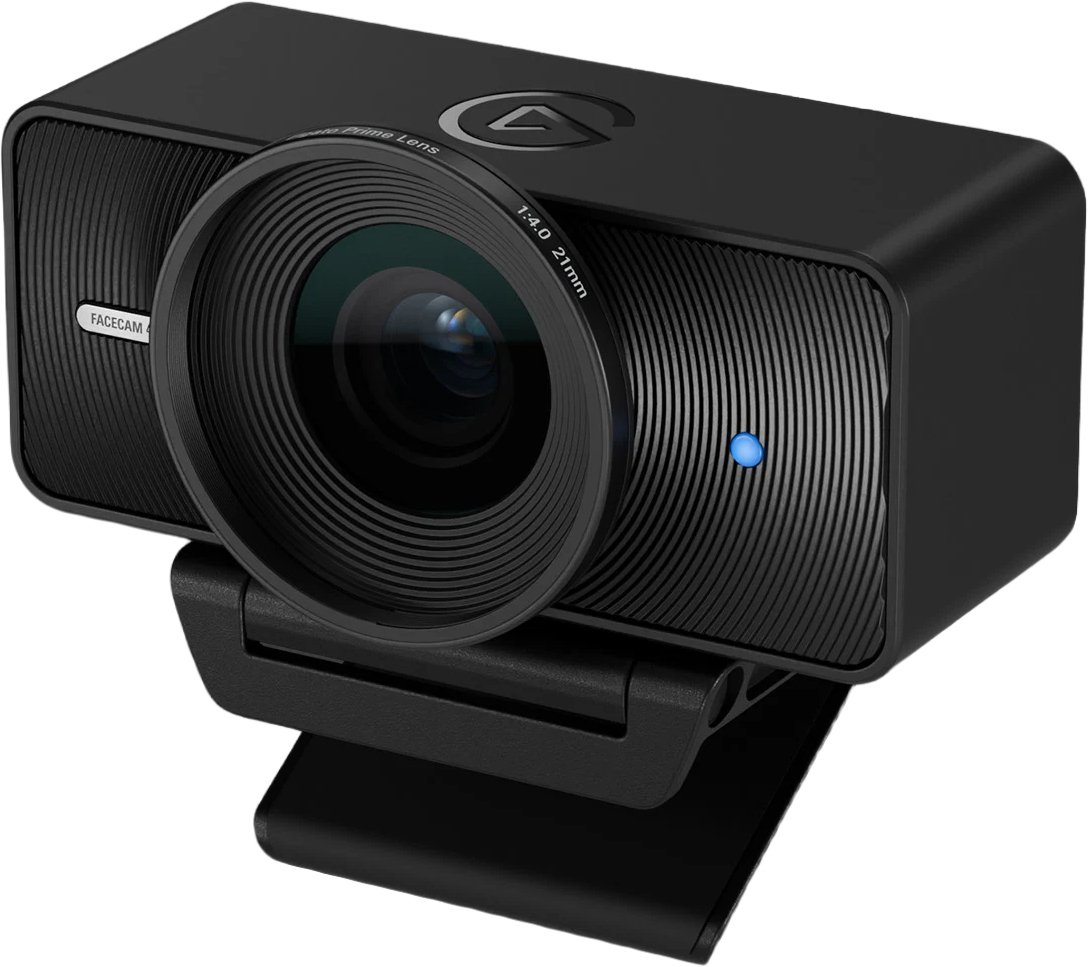
The Facecam 4K uses a large central lens, textured housing and a compact monitor mount.
Elgato Facecam 4K: key specifications
Product type: USB studio webcam for streaming and video production
Model/SKU: 10WAF9901
Image sensor: Sony STARVIS 2 CMOS, 1/1.8-inch
Lens: Elgato Prime Lens, 21mm focal length, f/4.0 aperture
Focus: Fixed focus
Focus range: 30–120cm at 4K; 25cm to infinity at 1080p
Field of view: Up to 90 degrees diagonal
Maximum video: 2160p (4K) at 60fps over USB 3.0 using MJPEG
Uncompressed video: Up to 4K30 in supported USB 3.0 formats
HDR: Up to 4K30
USB 2.0 operation: Up to 1080p60
Lens filter support: Standard 49mm filters
Connection: USB-C 3.0
Mounting: Monitor mount included; 1/4-inch thread
Microphone: No built-in microphone
Dimensions: 104 × 54 × 52mm without mount
Weight: 112g without mount and cable
Included: Webcam, monitor mount and detachable 2m USB-C to USB-C 3.0 cable
India price checked: ₹32,465 including taxes at Tanotis
4K at 60fps: what the webcam actually delivers
The Facecam 4K supports 2160p60 capture when connected over USB 3.0 and using MJPEG encoding. This gives streamers and creators a detailed image with smooth motion, useful when presenting products, demonstrating equipment or recording gestures and movement. At 4K30, the webcam also supports additional video formats, including NV12 and MJPEG, while the 1440p and Full HD modes offer further choices for balancing image quality and system load.
There is an important technical distinction between 4K60 and uncompressed output. The 2160p60 mode is MJPEG only; users seeking uncompressed or less compressed formats should check the available resolution and frame-rate combinations in Elgato’s specifications and their capture application. A USB 2.0 connection reduces the maximum supported resolution to 1080p60, so a suitable USB 3.0 port and cable are essential for the highest modes.
Sony STARVIS 2 sensor and Elgato Prime Lens
At the centre of the Facecam 4K is a 1/1.8-inch Sony STARVIS 2 CMOS sensor paired with Elgato’s Prime Lens. The lens has a 21mm focal length, f/4.0 aperture and fixed-focus design. The combination is intended for a stable desktop shooting position, where the camera can deliver a consistent image without autofocus hunting during a stream or presentation.
The 90-degree diagonal field of view can include the presenter and a portion of the surrounding desk or studio. It is wide enough for a two-person frame in some layouts, although the result depends on camera distance and room arrangement. The fixed focus range is specified as 30–120cm at 4K, so users should position themselves within this window for reliable sharpness. At 1080p, the specified range extends from 25cm to infinity.
49mm lens filters make this webcam different
The Facecam 4K supports standard 49mm lens filters, an unusual feature in a webcam. A circular polariser can reduce reflections from glass and shiny surfaces. Diffusion filters such as Black Mist can soften highlights and create a more atmospheric look, while starburst filters turn bright point lights into star-shaped effects.
These filters are optional accessories and are not all included with every regional package. The filter thread gives creators a familiar photography accessory system, but the effect depends on lighting, subject and filter quality. A polariser can also reduce the amount of light reaching the sensor, so exposure may need to be adjusted after attaching one.
HDR capture for high-contrast scenes
HDR is supported up to 4K30, with additional HDR modes available at lower resolutions. It can help retain more detail between bright and dark parts of a scene, especially when a presenter sits in front of a bright window or uses strong studio lighting. HDR is not available at 4K60 according to the official resolution table, so users should choose the mode that best fits their recording priorities.
For consistent results, keep lighting on the subject balanced and avoid relying on HDR to correct a poorly lit room. A soft key light placed in front of the presenter often produces a more controlled image than extreme backlighting. Test the final output in the streaming or meeting application, because HDR support can vary by software and operating system.
Manual controls, digital framing and onboard settings
Elgato’s software tools provide camera controls such as exposure, ISO, shutter speed, white balance, zoom and framing. Onboard setting storage helps the camera retain configured settings when moving between supported applications or restarting a computer. This is useful for creators who want the same look for regular streams, webinars and product demonstrations.
Manual controls are most effective when the desk lighting and camera position remain consistent. Set exposure and white balance deliberately, then make small adjustments rather than allowing every automatic control to change during a recording. Digital zoom and pan/tilt/zoom controls can help reframe the image without physically moving the webcam, although cropping reduces the amount of detail available in the final picture.
Elgato software update: Camera Hub and Elgato Studio
Elgato’s software position has changed during 2026. Its support documentation dated 4 November 2026 says Camera Hub has moved to legacy, end-of-life status and is no longer in active development, with information on the support page potentially outdated. Buyers should check Elgato’s current Elgato Studio software and device-support guidance before setting up a new Facecam 4K, rather than assuming that older Camera Hub instructions remain current.
Elgato also released Facecam 4K firmware 2.49 with Camera Hub 2.3 or newer. The update adds tint control and reports improvements to colour accuracy, noise reduction, motion clarity, sharpness and HDR. Because the software lifecycle has since changed, users should confirm the supported update route and compatible application version on Elgato’s current download and support pages before installing firmware.
No built-in microphone: plan your audio separately
The Facecam 4K does not include a microphone. This is intentional: the product is designed to prioritise video capture, leaving audio to a dedicated microphone or headset. For a professional streaming setup, a USB microphone, XLR microphone with an audio interface, or wireless lavalier system can provide better control over voice quality and placement than a small integrated webcam microphone.
Buyers should include audio equipment in their overall budget. A high-resolution camera feed paired with poor room audio can still make a stream feel unprofessional. Position the microphone close to the speaker, reduce room echo and monitor levels before going live.
The included monitor mount supports a compact desktop installation, while a 1/4-inch thread enables tripod use.
USB-C connectivity and system requirements
The webcam connects through USB-C and uses USB Video Class 1.5. Elgato specifies Windows 11 or later and macOS 13 or later, with support for Intel and Apple silicon systems. It can also work with iPadOS 17 or later on an iPad with a native USB-C port. A USB-A connection can be used with a suitable USB-C-to-A adapter, which is not included in the listed box contents.
For 4K60, connect directly to a compatible USB 3.0 port rather than a low-bandwidth hub. If the camera is connected through USB 2.0, the supported output is limited to 1080p60. Check the operating system, USB controller, cable and capture application before buying, especially when using a desktop with multiple front-panel ports or a laptop dock.
Elgato Facecam 4K price in India and availability
At the time of checking on 11 November 2026, Tanotis listed the Elgato Facecam 4K at ₹32,465 including taxes, with an Add to Cart option and free shipping shown. The retailer’s listing identifies the product as SKU 10WAF9901 and states a limited two-year manufacturer warranty. It also describes the item as a 4K60 webcam with a 1/1.8-inch sensor and 49mm filter support.
This price is based on a specialist retailer listing and should not be treated as a universal India market price. Confirm whether the product is physically in stock, the delivery estimate to your PIN code, warranty provider, GST invoice, return policy and final checkout amount. Also verify that the package includes the monitor mount and detachable USB-C 3.0 cable.
Who should consider the Elgato Facecam 4K?
Full-time streamers: 4K60 capture and manual image controls can support a polished camera feed.
YouTubers and presenters: The 90-degree view and fixed-focus range suit a planned desk or studio setup.
Product demonstrators: A 49mm polariser can help reduce reflections when filming glossy objects or glass.
Creative professionals: Diffusion and starburst filters provide additional visual effects without a separate camera body.
Remote professionals: It can deliver a high-quality camera image for supported meeting applications, although many calls will be limited by platform resolution.
What to consider before buying
The Facecam 4K is not a universal plug-and-play upgrade for every laptop user. Its fixed-focus lens is optimised for a defined distance, and users who regularly move around their desk may prefer a webcam with autofocus. It also has no built-in microphone, so a separate audio solution is necessary. The 4K60 mode requires USB 3.0 and MJPEG, while HDR is limited to 4K30.
Software support also deserves attention. Elgato’s support documentation now marks Camera Hub as legacy, so check the current Elgato Studio workflow and compatibility before purchase. At ₹32,465, this is a specialist creator camera; users who only need ordinary video calls may find a Full HD webcam more economical.
Our buying verdict
The Elgato Facecam 4K is a specialised webcam for creators who value detailed video, manual control and the ability to use standard photography filters. Its Sony STARVIS 2 sensor, 4K60 MJPEG capture, 4K30 HDR, 90-degree field of view and 49mm filter thread make it a distinctive desk-camera option. The absence of a built-in microphone is a trade-off, but one that makes sense for a dedicated streaming setup with separate audio equipment.
At the checked India listing of ₹32,465, it is best suited to streamers and professionals who will use its 4K modes and filter ecosystem. Before ordering, verify the retailer’s stock, warranty and software support, and make sure your computer has a suitable USB 3.0 connection. If you mainly make casual video calls, a lower-cost webcam may be the smarter purchase.
Check Elgato Facecam 4K availability in India
Tanotis listed SKU 10WAF9901 at ₹32,465 including taxes when checked on 11 November 2026. Confirm stock, delivery, warranty, GST invoice and return terms before checkout.
Affiliate disclosure: This article contains an Amazon affiliate link. BoldVoices may earn a commission if you make a qualifying purchase through it, at no additional cost to you.
Like what you read? Help BoldVoices.in keep independent journalism going.
Manage Consent
To provide the best experiences, we use technologies like cookies to store and/or access device information. Consenting to these technologies will allow us to process data such as browsing behavior or unique IDs on this site. Not consenting or withdrawing consent, may adversely affect certain features and functions.
Functional
Always active
The technical storage or access is strictly necessary for the legitimate purpose of enabling the use of a specific service explicitly requested by the subscriber or user, or for the sole purpose of carrying out the transmission of a communication over an electronic communications network.
Preferences
The technical storage or access is necessary for the legitimate purpose of storing preferences that are not requested by the subscriber or user.
Statistics
The technical storage or access that is used exclusively for statistical purposes.The technical storage or access that is used exclusively for anonymous statistical purposes. Without a subpoena, voluntary compliance on the part of your Internet Service Provider, or additional records from a third party, information stored or retrieved for this purpose alone cannot usually be used to identify you.
Marketing
The technical storage or access is required to create user profiles to send advertising, or to track the user on a website or across several websites for similar marketing purposes.